Remote work is wonderful. Coffee, your favorite chair, no traffic jams. But sometimes a client writes: "Please send a scan of the signed contract to proceed with the next steps."
In the office, you would simply walk up to the big copier. But at home?
Buying a scanner for just a couple of papers a month is silly (it takes up half your desk). Running to the nearest copy center takes too long, and you don't want to leave your house for just one sheet.
I'll Just Take a Photo and Send It via WhatsApp
Please, don't do that.
A photo of a document taken against a laminate background is unprofessional. Even if you have a flagship smartphone with a great camera, the result will be subpar:
- A shadow from your hand will obscure the text.
- The paper will look gray instead of white.
- The text will be at an angle.
Lawyers and accountants hate such "documents." They can't be printed properly, are hard to read, and look unserious.
A Pocket Scanner Without Wires
To turn paper into a PDF that you won't be embarrassed to send to the CEO of a large corporation, use phonescan.me.
This isn't just a camera. It's an algorithm that understands it's dealing with a document, not a cute cat.
- Straightening: You can shoot at an angle (to avoid casting a shadow), and the service will "straighten" the page and make it flat.
- Cleaning: Filters remove noise, the texture of the table, and gray tones. The background becomes perfectly white.
PRO TIP: You need to be near a window. Place the document on the windowsill or floor nearby. Natural diffused light will eliminate harsh shadows and make the text as clear as possible. No desk lamp can achieve that.
Step-by-Step Algorithm: From Signing to Sending in 1 Minute
You receive the contract via email. Here's what to do:
- Print the document (if you don't have a printer, you can sign it on a tablet, but if a "live" signature is needed, print it).
- Sign it with a blue pen.
- Open Phone Scan. Open phonescan.me on your phone and allow camera access when prompted.
- Capture the document. Point the camera at the signed page and tap to capture. Shoot at an angle if needed to avoid casting a shadow.
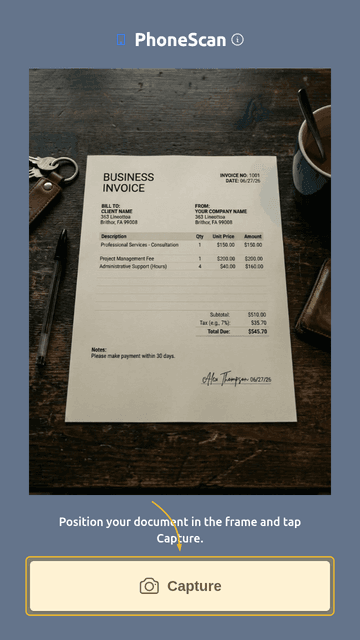
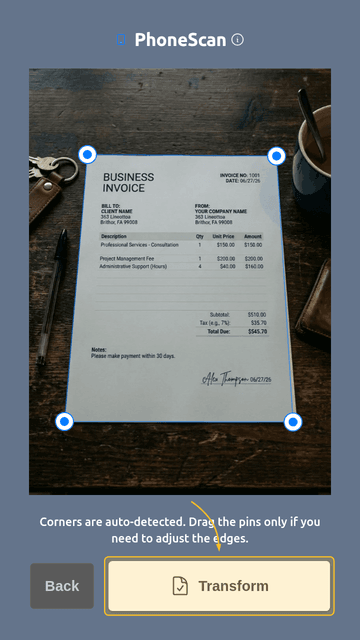
- Review corners. Corners are detected automatically. Drag the markers only if you need to correct them, then tap Transform.
- Check the clean scan. The page is straightened and the background is cleaned automatically. Review the result before sending.
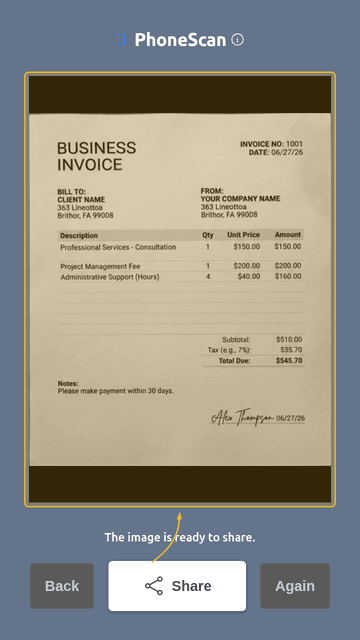
- Share or save. Tap Share or Download to send the file via email or messenger. Repeat for any additional pages.
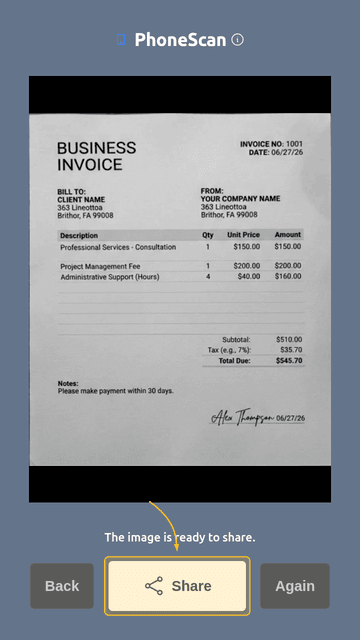
That's it. The file is ready to be sent via email or messenger. You didn't even have to get up from your chair (well, maybe just to walk to the window).
Technology Should Simplify Life, Not Complicate It
You don't need a bulky scanner to conduct business professionally. Your office is wherever you are – whether it's the living room, kitchen, or a porch.