Scan documents in 4 simple steps using your phone's camera.
Start Camera
Tap the button to activate your camera. Allow camera access when prompted.
Capture Photo
Position your document in the frame and tap to capture. Hold steady for best results.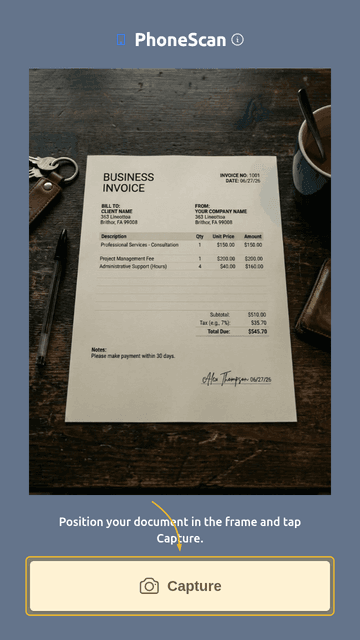
Review Corners
Corners are detected automatically. Drag the blue markers only if you need to correct them. The scan is straightened and enhanced for you.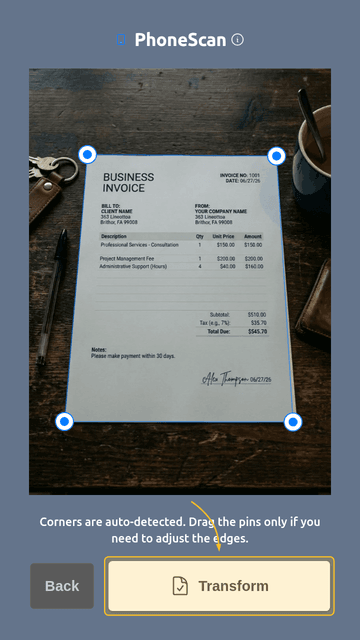
Share or Save
Review your scan, then tap Share or Download. Scans are saved as PNG images. You can send them via email, messaging apps, or save to cloud storage.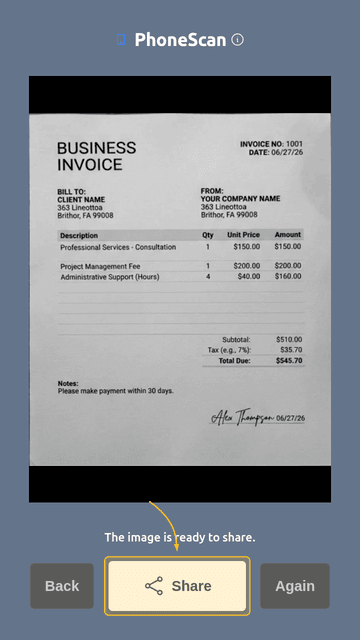
Note: Currently, scans are saved as PNG images. OCR text recognition and PDF export will be available in future versions. Please use external services if you need these features.
Privacy: All processing happens on your device. Your photos are never uploaded to any server.