You hold your phone over a document, tap the shutter, and the result is disappointing: dark shadows across half the text, or a bright white blob where the light bounced off the page.
Shadows and glare are the most common enemies of a clear document photo. The good news: you can beat them with a few simple adjustments.
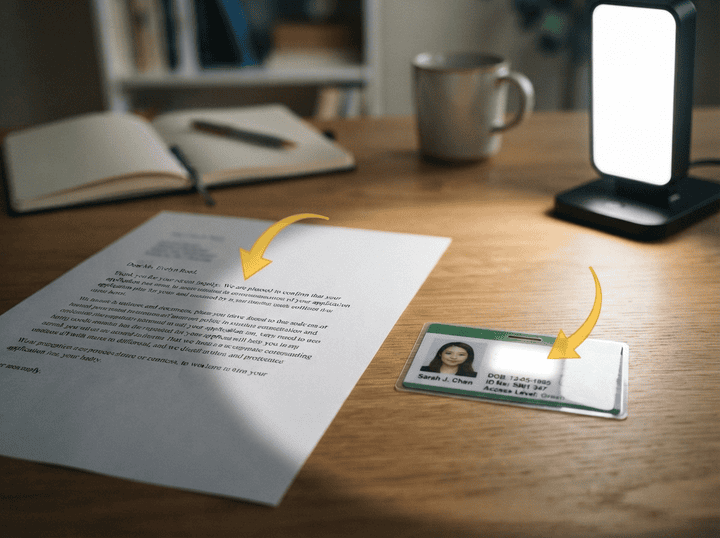
Lighting
- Use even, diffuse light. A single harsh lamp from one side creates strong shadows. Prefer overhead light or two sources from opposite sides.
- Natural light works well. Near a window on an overcast day gives soft, even illumination without hot spots.
- Avoid direct flash. The built-in flash often causes glare on glossy paper and laminated items.
- Watch your own shadow. Stand so that your body or phone doesn't cast a shadow onto the document.
Angles
- Shoot slightly from the side. A 30–40 degree angle helps avoid reflections from overhead lights and reduces glare on glossy surfaces.
- Move, don't tilt the paper. If you see a bright spot, step to the side and reshoot instead of tilting the document.
- Keep all four corners in frame. The service can correct perspective, but it needs to see the full document.
Focus
- Tap to focus on the document. Make sure the camera focuses on the text, not the table or background.
- Hold steady. Blurry images lose contrast and look like shadows. Support your phone or rest your arms on the table.
- Keep the right distance. Too close and you lose sharpness; too far and details get lost.
Pro tip: For glossy magazines, laminated IDs, or anything shiny, shooting at an angle is often the only way to avoid glare. The service corrects the perspective automatically, so you get a straight document from an angled photo.